Browser History Viewer and Internet Activity Analysis Software
Analyze browsing activity across users, browser profiles, and supported browsers on your computer. See how the browser was used, investigate individual records, and review the available data before purchasing a license.

Hetman Internet Spy™ 4.3
Internet Spy™ analyzes browser data stored on the computer and reconstructs a detailed picture of a user’s online activity. Review visited websites, search queries, social media and webmail activity, browsing sessions, frequently visited sites, saved accounts and available passwords, bookmarks, downloads, and images stored in the browser cache.
Download and analyze your browser data for free before purchasing a license. The program automatically detects users, browser profiles, and supported browsers, and lets you browse the discovered information and inspect source browser files. Purchase a license only when you are satisfied with the results and want to export the collected data as a structured Excel, HTML, or PDF report.
Watch this quick-start video to see how Internet Spy™ analyzes browser activity on your computer. Select a user account and browser to review visited websites, search queries, social media and webmail activity, browsing sessions, downloads, bookmarks, saved accounts, and other browser data in a detailed activity report.

Use Internet Spy™ to understand how a computer was used online, review browsing patterns and saved browser data, examine activity across websites and online services, and inspect the original browser files behind the collected information.

See which websites were visited, when they were opened, how often they were visited, and how long pages remained active. Internet Spy™ groups related visits, identifies frequently visited websites, and helps you understand how a user spent time online.

Review search queries and identify activity on popular social networks, video services, webmail platforms, and online translators. Recognized activity is organized into dedicated categories, while other websites remain available in the general browsing history.

Discover website accounts stored in the browser, usernames and available unencrypted passwords, download history, and bookmarks. The software also provides detailed information about individual records, including login usage, download sources, local file paths, and timestamps when this information is available in the browser data.

A browser can be removed while its profile and data files remain on the computer. Internet Spy™ searches standard browser-profile locations and can detect and analyze remaining history databases, bookmarks, sessions, saved accounts, and other available browser data even when the browser itself is no longer installed.

Examine the original files from which the browser activity was obtained. Open browser profile files, inspect SQLite databases and their tables, view text-based data, or use the built-in HEX viewer to search, navigate by offset, and examine raw file contents.
Internet Spy™ turns browser profile data into structured information about a user’s online activity. Explore browsing history, searches, sessions, accounts, downloads and cached images, inspect the original browser files, and export the results as a detailed report.
Internet Spy™ analyzes the browsing history stored in the selected browser profile and provides detailed information about every visited website and webpage. For each record, you can review the URL, page title, visit time, last visit, visit count, referrer, transition type, and other available browser metadata.
The program also helps reveal browsing patterns by showing page activity time, repeated visits, and visit frequency. Related records can be grouped by activity on the same day, all visits to a specific page, or all visits to the same website, making it easier to understand when and how often a user returned to particular online resources.
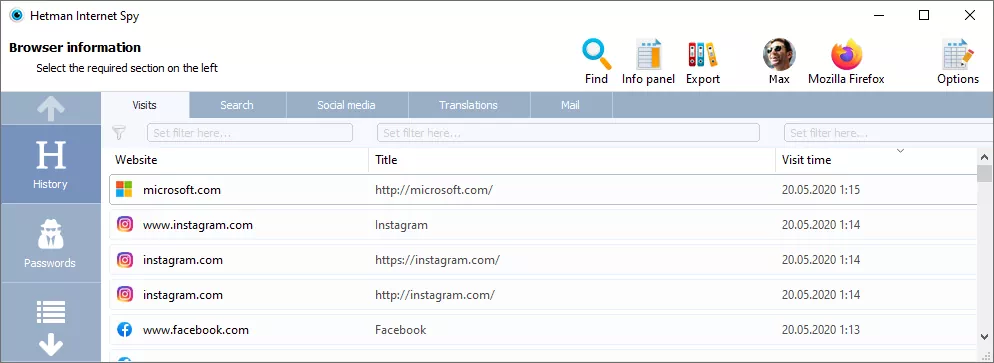
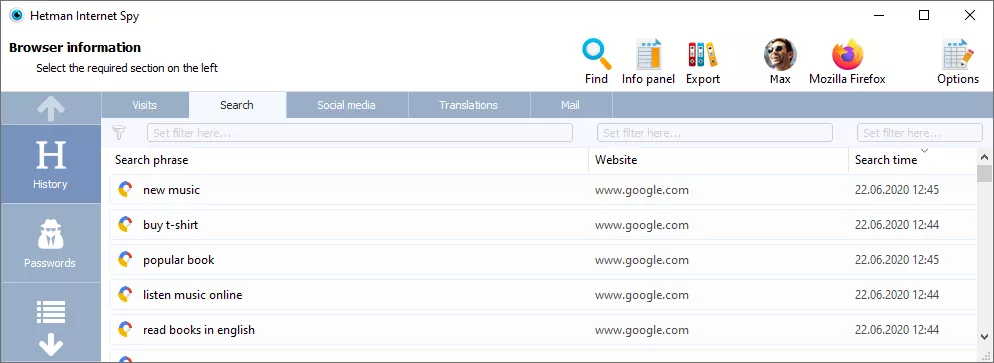
Internet Spy™ automatically recognizes different types of online activity stored in the browser history and organizes them into dedicated sections. You can review search queries, activity on popular social networks and video services, webmail activity, and requests sent to online translation services without manually searching through the complete list of visited URLs.
Depending on the available browser data, the program can show the search phrase, website or service, account, page or message subject, translation text and languages, visit time, activity duration, and visit frequency. Services that are not recognized automatically remain available in the general browsing history, so their visits are not excluded from the analysis.
Internet Spy™ groups related browser activity into browsing sessions, helping you understand the sequence in which webpages and tabs were used. For individual session records, the program can show the website, page title, URL, referrer, original URL, transition type, tab information, and closing time available in the browser data.

The Top Sites section provides a quick overview of the websites a user visits most frequently. Together with visit counts and activity information from the browser history, this makes it easier to identify regularly used websites and typical browsing patterns without reviewing every history record individually.

Internet Spy™ extracts information about website accounts and saved login credentials from the selected browser profile. The program can show the website or service, username, login page URL, account creation time, usage count, and other authentication data stored by the browser.
If a browser stores the password in an unencrypted form available in its profile data, Internet Spy™ can display the saved password as well. Encrypted passwords are not decrypted. The usage count helps identify which saved accounts were used most frequently.

Internet Spy™ extracts bookmarks and favorites saved in the selected browser profile and preserves their folder structure. For each bookmark, you can review the page title, URL, date and time it was added, and other available browser metadata.
The Downloads section shows which files were downloaded through the browser and provides detailed information such as the source URL, referrer, file name, local path, MIME type, file size, download start and finish time, and current status. If the downloaded file has already been removed from the disk, the program can indicate it as deleted, while preserving the available download-history record.

Internet Spy™ extracts images stored in the browser cache while websites are being viewed. The Images section displays cached graphics as thumbnails and lets you preview individual files to see visual content that was loaded by the browser during previous browsing sessions.
For each cached image, the program can show the file format, resolution, file size, and creation time. Selected images can also be saved as separate files for further review. Cached images may have been loaded automatically as part of a webpage and do not necessarily indicate that the user downloaded them manually.

Internet Spy™ automatically analyzes the current operating system and detects user accounts, supported browsers, and multiple browser profiles. Select a system user to see the browsers associated with that account, then choose a browser profile to analyze its available history and other stored activity separately.
The software works on Windows, Linux, and macOS and searches the standard locations where browsers store their profile data. It supports Google Chrome, Microsoft Edge, Mozilla Firefox, Safari, Opera, Brave, Vivaldi, Chromium, Yandex Browser, Internet Explorer, and other compatible Chromium-based browsers.
Different profiles belonging to the same browser are detected separately, making it possible to analyze browser activity for multiple profiles under the same operating-system account without locating their databases manually.
Browser data can remain on the computer even after the browser itself has been uninstalled. If its profile files are still present in their standard location, Internet Spy™ can detect the remaining profile and analyze the available history, sessions, bookmarks, downloads, accounts, cached images, and other browser data. Source browser files are accessed in read-only mode and are not modified during analysis.

Internet Spy™ provides direct access to the browser profile files used as sources for the analyzed activity. You can review file names, types, sizes, status, full paths, creation and modification dates, and open individual browser data files for closer inspection.

For browser databases such as SQLite, the built-in database viewer displays available tables, records, fields, and table structure without requiring third-party tools. You can inspect column names, data types, default values, primary keys, and other schema information to verify the original data behind the browser activity report.
Internet Spy™ includes a built-in HEX viewer for low-level inspection of browser profile files. Open the original data source and examine its raw contents when you need to verify information that is not available through the structured browser-history or database views.
The HEX viewer supports text and hexadecimal search, navigation by offset, and copying selected data. This makes it possible to inspect browser files directly without opening them in a separate hex editor.
Internet Spy™ provides tools to quickly find and organize relevant information inside the current browser report. Use search by mask, such as *password*, together with case-sensitive matching, whole-word matching, and search direction to locate specific records in large amounts of browser data.
History and activity records can also be filtered and sorted by fields such as website, page title, and visit time. Related activity can be grouped to show visits on the same day, all visits to a selected page, or all visits to the same website, making it easier to analyze browsing patterns and repeated activity.
Internet Spy™ can export the analyzed browser data as a structured report for further review, archiving, or sharing. Reports are available in Excel, HTML, and PDF formats and preserve the information collected from the selected user and browser profile.
The Report Wizard lets you export all available sections or only the categories you need, such as browsing history, searches, social media and webmail activity, sessions, accounts, bookmarks, downloads, and other analyzed browser data. This makes it easy to turn the results of the analysis into a readable report without manually copying individual records.

-
Can I view browser history for different users and browser profiles?
Yes. The software automatically detects operating-system user accounts, supported browsers, and multiple browser profiles. Each user and browser profile can be selected and analyzed separately, making it possible to review browsing activity from several users or profiles on the same computer.
-
Can I view browser history after the browser has been uninstalled?
Yes, if the browser profile and its data files remain on the computer. Internet Spy™ searches the standard browser-profile locations and can detect history databases, sessions, bookmarks, downloads, saved accounts, and other available browser data left behind after the browser itself has been uninstalled.
-
Can I view browser history if a VPN or proxy was used?
Usually, yes, provided that the browser stored the activity in its local profile. A VPN or proxy changes or encrypts network traffic, but it does not normally prevent the browser itself from recording visited pages in its local history. If those records remain in the browser data, Internet Spy™ can analyze them.
-
How far back can Hetman Internet Spy show browsing history?
There is no fixed period. Internet Spy™ can display the browsing records that are still available in the browser profile. How far back the history goes depends on the browser, the profile data, browser settings, and whether the user has cleared or automatically removed older browsing records.
-
Can Hetman Internet Spy recover a downloaded file that has been deleted?
No. The Downloads section can preserve information about a browser download, including the source URL, file name, local path, size, timestamps, and whether the downloaded file is currently deleted from the disk. Internet Spy™ does not recover the deleted file itself. For deleted-file recovery, use Hetman Partition Recovery.